Earn Points, Redeem Points and Customer
-
Earn Points :
Earn Points allows customers to collect points by performing specific actions on your store. These points encourage engagement and help build long-term customer loyalty.
-
What Are The Ways For Customers To Earn Points?
Customers can earn points through a variety of actions that you enable for your store in the loyalty program:

- Sign Up Rewards – Earn points by creating an account.
- Birthday – Reward customers for sharing their birthdate.
- Custom Rule Bonus: You can create your custom rule to reward points for a specific task.
- Follow on X (Twitter) – Gain points for following your brand.
- Follow on Instagram – Boost your IG followers and reward users.
- Follow on TikTok – Drive social media growth by offering points.
- Share Link on X (Twitter) – Encourage social sharing with point incentives.
- Share Link on Facebook – Get customers to spread the word.
- Like Facebook Page – Reward fans for liking your page.
- Visit a Link – Incentivize traffic to specific URLs.
- Subscribe to Newsletter – Reward customers for joining your email list.
- Place an Order – Earn points with every purchase.
- Post A Product Review: Points for posting a product review.
-
Loyalty Points Configuration:
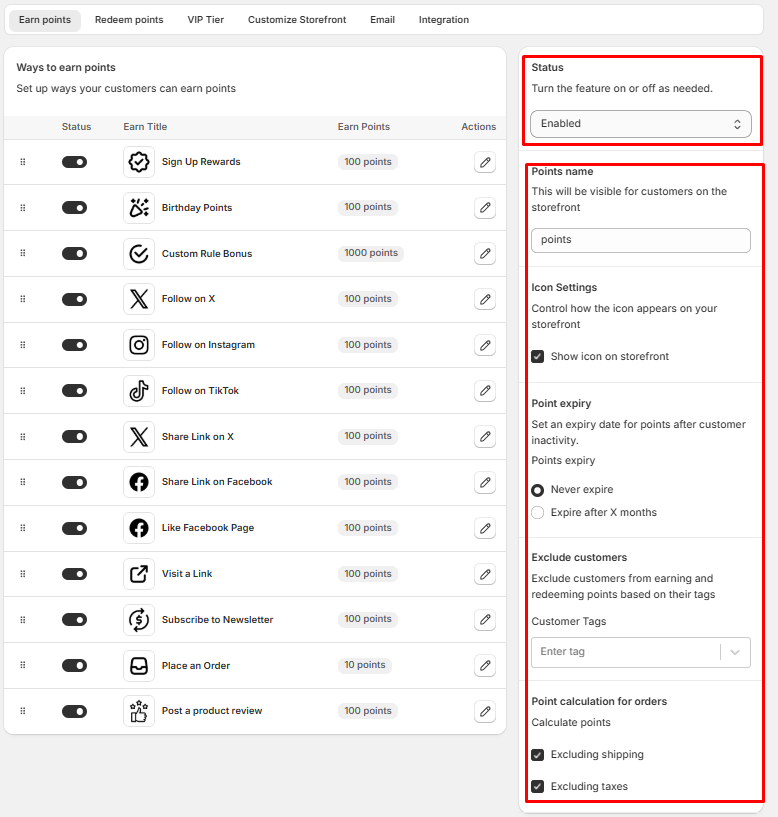
- Status : To enable or disable the Loyalty Program on your store.
- Points name : Define a custom name for your Point/Reward currency (e.g., "Credits," "Stars," or "Tokens"). This label will be visible to customers across your store.
- Icon Settings : Enable this setting to feature the "Earn Points" icon on the storefront Loyalty page
- Point Expiry : This option lets you set if you would want to expire the points.
- Never Expire : Points will never expire
- Expire After X Months : Set points to expire a specific number of X months after the date they were issued.
- Exclude Customers : This feature allows you to exclude a customer from earning points based on the tag you have assigned in your store for the customer
- Point Calculation for Orders : Determine how points are calculated from customer purchases.
- Exclude Shipping Charges
- Exclude Taxes
-
Redeem Points :
Redeem Points allows customers to exchange their earned points for exciting rewards, boosting their motivation to stay engaged and purchase more.
- To create the Redeem point, Select the Redeem Point tab and click on the Add way to redeem button

-
Ways To Redeem Points
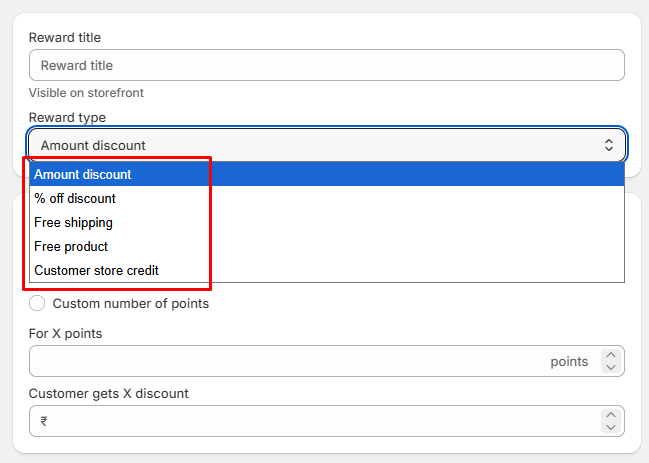
- Reward Title : Name your reward to identify it easily.
- Select Discount Type :
- Amount discount :
- Fixed number of points : Select the points against the amount you wish to offer as a discount
- Custom number of points : Customers decide how many points to spend within configured limits, allowing personalized redemption based on point balance. You can set minimum and maximum number of points to redeem at once.
- % off discount : Lets you customer redeem X points to unlock a X% discount on next order
- Free shipping : Offer free shipping against specific number of points.
- Set maximum shipping price : The feature allows you to set a maximum shipping cost for offering a discount. Users will be charged if the shipping amount exceeds this limit.
- Free product : Offer a product againts a specific number of points for redemption.
- Customer store credit : Directly offer a specific amount discount against points by utilizing store credit in your store.
- Amount discount :
-
Redeem Points Configuration:
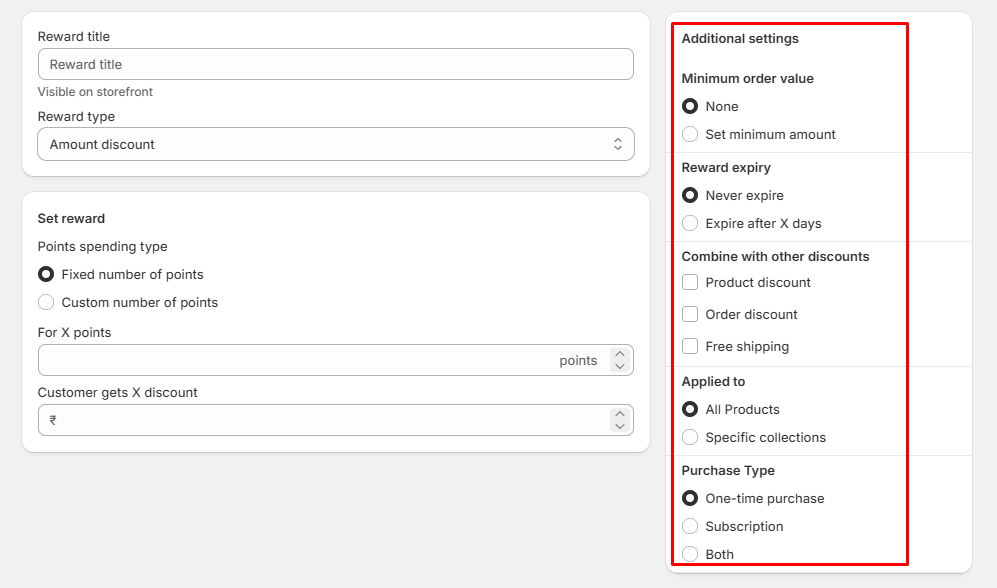
- Set Minimum Order Value:
- None: No minimum purchase required.
- Set Amount: Define a minimum order total to apply the reward.
- Reward Expiry:
- Never Expires: The reward remains valid indefinitely.
- Expires After: Set the number of days before the reward expires.
- Choose whether this reward can be combined with other discounts:
- Product discounts
- Order discounts
- Free shipping
- Applied to:
- All Products : By default redeem point will be available for all the product.
- Specific Collections : You can limit this to only selected collection here.
- Eligible Purchase Types:
- One-time Purchases
- Subscriptions
- Both
Customers in Loyalty Program:
- You can easily monitor loyalty engagement from Loyalty & Referral tab under the Customer section.

- View all loyalty and referral members here. Use the eye icon under "Actions" to see the details and manage their points and tiers.
